Introduction
This document describes the standardized procedures for DH Deployment and DH Migration.
1. Pre-requisites
Before proceeding with deployment or migration activities, refer to the Introduction document to familiarize yourself with the DH platform and its core components.
2. Documents
The following documents provide detailed guidance for deployment and migration activities.
| Section | Description | Documentation |
|---|---|---|
| 1. Deployment | Overview of the deployment process described in this document. | Deployment Overview |
| 1.1 DH APP & DH API Deployment | Deployment procedures for the DH Application and DH API services (Orchestrator and Executor). | DH API Deployment |
| 1.2 DH PROD & DH IMPL Deployment | Deployment procedures for DH PROD releases and client-specific DH IMPL releases. | DH PROD Deployment |
| Section | Description | Documentation |
|---|---|---|
| 1. Migration | Overview of the migration process described in this document. | Migration Overview |
| 1.1 DH APP & DH API Migration | Application migration approach and DH API migration considerations. | DH Application Migration |
| 1.2 DH PROD & DH IMPL Migration | End-to-end migration process, migration scripts, and DH_CUSTOMER repository maintenance. | DH PROD Migration |
The following documents provide detailed guidance for deployment and migration activities.
The primary objective of this process is to establish a standardized mechanism for tracking deployments and migrations, thereby enabling efficient execution of incremental upgrades and changes.
3. Deployment
Deployment Guidelines
For deployments, the BSA Team will provide the versions of current DH components (refer to the Version Tracking section below).
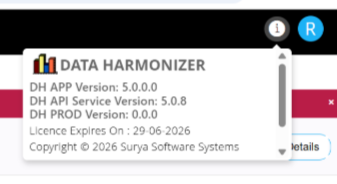
- The BSA Team may specify a target release version based on project requirements.
- If no specific version is requested, deployment to the latest stable release is recommended.
- The final deployment version should be confirmed by the BSA Team after reviewing the release notes and assessing the impact of the proposed changes.
- Based on the currently deployed version and the agreed target version, the Deployment Team will execute the required incremental upgrade scripts (seeds).
4. Migration
The migration process consists of the following steps:
| Step No. | From | To | Description | Note |
|---|---|---|---|---|
| 1 | BSA Team | Deployment Team | Send a migration request email, including an optional end date up to which data should be extracted. | If no end date is provided, the migration date will be treated as the extraction end date. |
| 2 | Deployment Team | Implementation Team | Send a downtime notification after accepting the migration request. | No configuration changes should be made during the downtime window, as such changes may not be included in the migration. |
| 3 | Deployment Team | Source Database | Extract data from the source database. | |
| 4 | Deployment Team | Destination Environment | Generate a comparison report in the destination environment. | |
| 5 | Deployment Team | BSA Team | Share the comparison report path for verification. | |
| 6 | BSA Team | Deployment Team | Review the comparison report and provide approval or rejection to proceed. | |
| 7 | Deployment Team | Stakeholders | Complete the migration or mark it as failed based on the review outcome, and communicate the final status. |
Migration Notes
Specific batch migration is not supported. Data extraction can only be performed using an end date. Migration planning should therefore be aligned accordingly.
In cases where an incomplete batch configuration migration cannot be avoided through end-date-based extraction:
- Disable the affected batch configuration in the destination environment, or
- Inform the relevant stakeholders not to use the migrated batch configuration.
The migration process maintains a backup of the immediately preceding step.
- If rollback is required after migration completion, the BSA Team must raise a separate rollback request with the Deployment Team.