file_validator
1. Description
File Validator program reads input files in TXT, CSV, XLS, or XLSX formats. It performs a comprehensive set of structural, content, and business validations before the file is allowed to proceed for downstream processing.
2. Program location
<installation_path>/file_validator
3.Screen Configuration
3.1 Process Config Fields
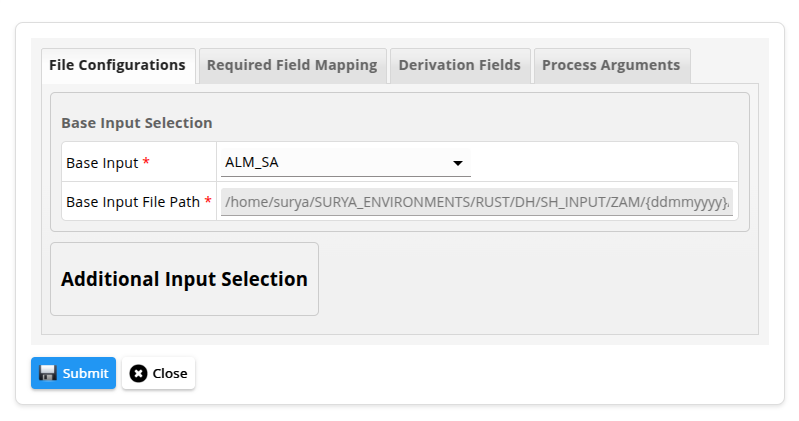 Here enter the base input file and additional inputs required for the setup.
3.2 Process Derivations
Here select the validation types. Based on validation type a required filed section will come which needs to be filled with required values for validations.
3.2.1 Derivations desc
| # | Parameters | Description | DerivationType |
|---|---|---|---|
| 1 | FileType | Verifies whether the input file extension is correct, it exists and can be opened. | FileType |
| 2 | AmtField | Field is used for calculating health check amount. | AmtField |
| 3 | FooterCount | Validates footer record count matches actual row count. | FooterCount |
| 4 | ColumnCount | Ensures each line/row has the expected number of columns. | ColumnCount |
| 5 | Duplication | Checks for duplicate entries in specified duplication key columns. | Duplication |
| 6 | ValuesIN | Ensures values belong to the allowed set. | ValuesIN |
| 7 | ValuesNOTIN | Ensures forbidden values are not present. | ValuesNOTIN |
| 8 | DataType | Validates data type of specified columns. | DataType |
| 9 | DateFormat | Validates date format and parseability. | DateFormat |
| 10 | NullValidation | Validates specified columns for non-empty values. | NullValidation |
| 11 | RangeCheck | Verifies value is within allowed range. | RangeCheck |
| 12 | MatDateCheck | Ensures maturity date is not earlier than As-On-Date. | MatDateCheck |
3.3 Process Arguments
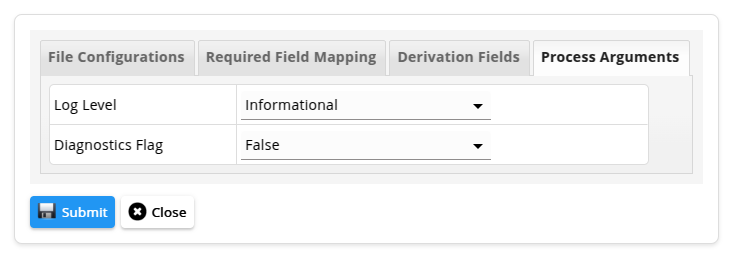
Here enter the process arguments to be passed to the program. The mandatory and non-mandatory fields are given below.
3.3.1 Mandatory Parameters
| # | Parameters | Description | Example |
|---|---|---|---|
| 1 | log-file | Contains the detailed logs of the program showing the validations that are failing along with the column and row level details. | log.txt |
| 2 | diagnostics-log-file | Contains the concise logs of the program showing the the number of failures for each validations. | diag-log.txt |
3.3.2 Non Mandatory Parameters
| # | Parameters | Description | Default value | Example |
|---|---|---|---|---|
| 1 | log_level | Level of diagnostics written to the log file. | info | error/warn/info/debug/trace/none |
| 2 | is_perf_diagnostics_enabled | The flag that decides whether performance diagnostics will be written to the diagnostics log file. | false | true or false |
Click ⬇️ to download the sample data.
4. Output
This program generates a detailed log file that captures the complete validation trace of the input file. The log provides row-level and column-level visibility into validation failures, clearly indicating which validation rule failed, for which record, and for which field or column.
Each log entry includes the validation category, error type, priority level, and a descriptive message, enabling quick identification and root-cause analysis of data issues.
In addition to the detailed log file, the program generates a concise diagnostic summary log when the is_perf_diagnostics_enabled parameter is set to true. This summary log provides a high-level view of validation outcomes, listing each validation that failed along with the corresponding number of failure occurrences.