group_by_aggr
1. Description
The Group By Aggregation program processes input files in TXT, CSV, and CF formats to perform aggregation operations on structured data, groups records based on user-defined keys, computes aggregate functions such as SUM, AVG, COUNT, MIN, MAX, and Weighted Average, and writes the aggregated output to a TXT file.
2. Program location
<installation_path>/group_by_aggr
3.Screen Configuration
3.1 Process Config Fields
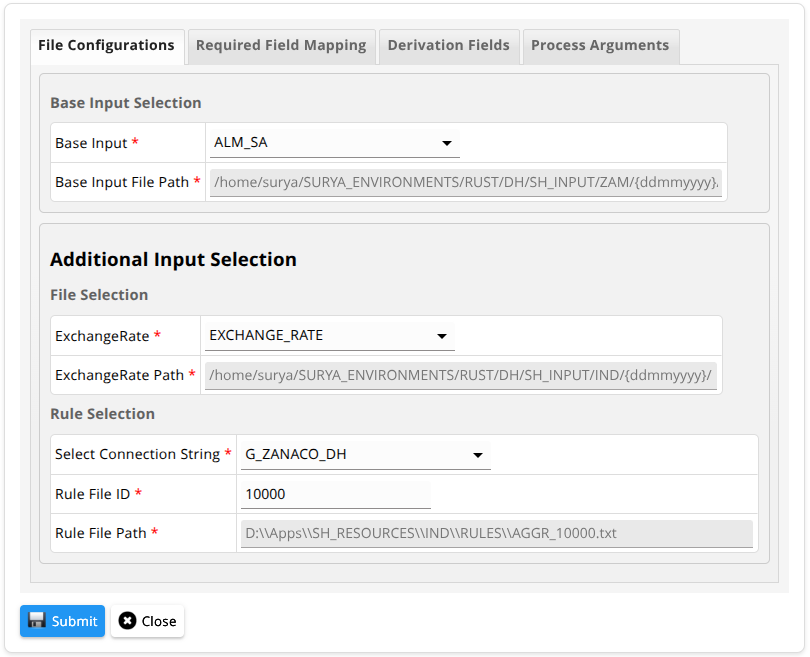
Here we have to provide Input file, Exchange rate file and Rule file details here.
3.2 Required Fields
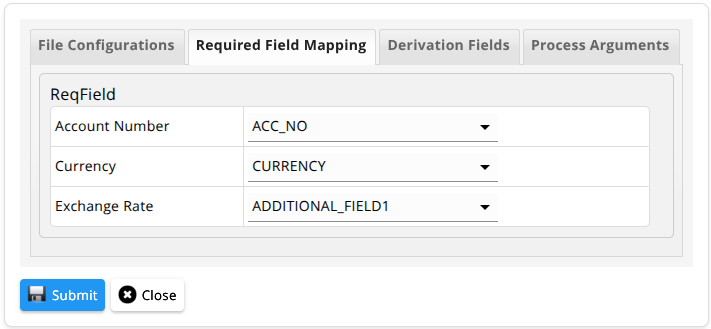
Here we have to provide the fields which contains Account Number, Currency and Exchange Rate respectively.
3.3 Process Derivations
Here select the derivation types. Based on derivation type a required filed section will come which needs to be filled with required values for derivations.
3.3.1 Derivations desc
| # | Parameters | Description | DerivationType |
|---|---|---|---|
| 1 | GroupBy | Defines the key fields used for grouping records; multiple fields can be combined to form a composite key. | GroupBy |
| 2 | SUM | Computes the sum of values for the specified expression after grouping. | SUM |
| 3 | AVG | Calculates the average of values for the specified expression within each group. | AVG |
| 4 | COUNT | Counts the number of records within each group. | COUNT |
| 5 | MIN | Finds the minimum value of the specified expression within each group. | MIN |
| 6 | MAX | Finds the maximum value of the specified expression within each group. | MAX |
| 7 | WtdAvg | Computes the weighted average based on value and weight expressions within each group. | WtdAvg |
| 8 | Expression | Computes derived values using expressions based on previously generated output fields. | Expression |
| 9 | Constant | Assigns a constant value to an output field for all grouped records. | Constant |
| 10 | ConfigParams | Populates configuration-based values such as AS_ON_DATE into output fields. | ConfigParams |
| 11 | DERIVE_LLG | Populates LLG values into the output field based on rule logic. | DERIVE_LLG |
3.4 Process Arguments
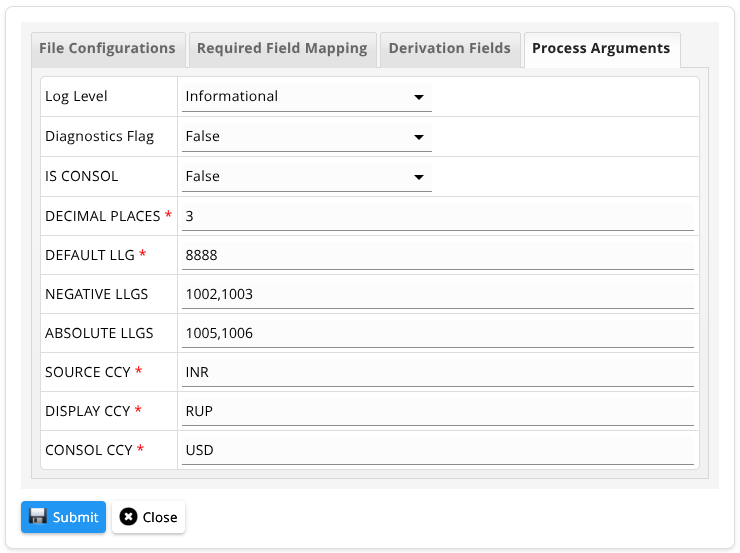
Here enter the process arguments to be passed to the program. The mandatory and non-mandatory fields are given below.
3.4.1 Mandatory Parameters
| # | Parameters | Description | Example |
|---|---|---|---|
| 1 | process-config | Path to process config file that needs to be processed. | /path/to/process_config.json |
| 2 | as-on-date | The date for which the program has to run (format: DD-MM-YYYY). | 28-11-2024 |
| 3 | log-file | Contains the detailed logs of the program execution. | log.txt |
| 4 | diagnostics-log-file | Contains concise diagnostics logs including performance and summary details. | diag-log.txt |
| 5 | decimal-places | Number of digits to retain after the decimal point (values are rounded). | 2 |
| 6 | default-llg | Default LLG value used when no rules are matched. | 8888 |
| 7 | src-ccy | Source currency of the input data. | INR |
| 8 | disp-ccy | Display currency for output representation. | RUP |
| 9 | consol-ccy | Consolidation currency used for aggregation. | USD |
3.4.2 Non Mandatory Parameters
| # | Parameters | Description | Default value | Example |
|---|---|---|---|---|
| 1 | log-level | Level of diagnostics written to the log file. | INFO | error/warn/info/debug/trace/none |
| 2 | diagnostics-flag | The flag that decides whether performance diagnostics will be written to the diagnostics log file. | false | true or false |
| 3 | negative-llgs | Comma-separated LLGs for which negative transformation is applied; if empty, applied to all LLGs. | "" | 1001,1002 |
| 4 | absolute-llgs | Comma-separated LLGs for which absolute transformation is applied; if empty, applied to all LLGs. | "" | 1003,1004 |
| 5 | is-consol | Flag to indicate whether amounts are already consolidated. | false | true or false |
Click ⬇️ to download the sample data.
5. Output
This program generates an output file in TXT format containing the aggregated results after performing the Group By operations. The output consists of grouped records based on the specified keys, along with the computed aggregation values such as SUM, AVG, COUNT, MIN, MAX, and Weighted Average.
Each output record represents a unique group formed using the configured Group By fields, and includes all derived fields as defined in the process configuration. All numeric values in the output are formatted according to the specified decimal precision, and all date fields are represented in DD-MM-YYYY format.
In addition to the output file, the program generates a detailed log file that captures the execution flow and any issues encountered during processing. A diagnostics log file is also generated, which provides a concise summary of execution details when the diagnostics flag is enabled.