irrbb_aggr_nm
1. Description
Overview
The Irrbb_aggr_nm program is designed to read multiple CF (Cash Flow) files in metadata format and process them for aggregation and consolidation. The program works as follows:
***|Reading CF Files: It can process multiple CF files at the same time.
Each CF file is passed to the aggregator, which performs aggregation based on the bais of ***|LLG ***|Country ***|Currency (CCY) ***|Cf freq ***|Interest Basis (int_basis) ***|Cap ***|Floor ***|Benchmark ***|Category
Merging Outputs
Once the aggregation for each CF file is completed, the program will merge the individual aggregator outputs.
Consolidation
The merged output is then passed to the consolidation (consol) process, where the data is consolidated into a single file.
Loading Data to IRB20 Table
Finally, the consolidated output will be loaded into the IRB20 table for further processing.
2. Program location
<installation_path>/irrbb_nm_2
3. Input
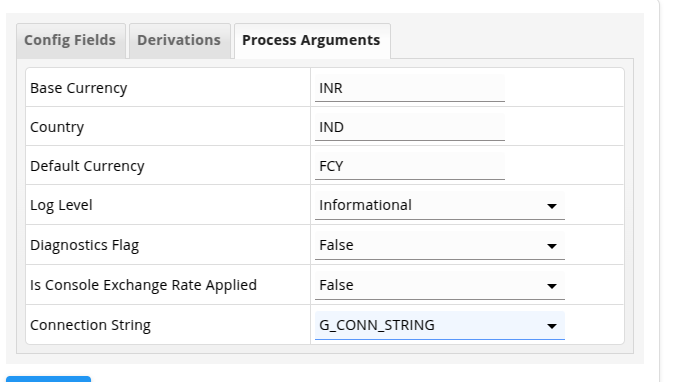
3.1 Mandatory Parameters
| # | Parameters | Description | Example |
|---|---|---|---|
| 1 | as_on_date | The date for which the program has to run | 26-09-2023 |
| 2 | process-config | Path to process config file that needs to be processed | configs/process.json |
| 3 | connection-string | Connection credentials to connect to the database | Oracle (Username|Password|IP:PORT/Servicename) |
| 4 | default_currency | The default currency | USD |
| 5 | log-file | Path to write logs | logs/application.log |
| 6 | diagnostics-log-file | Path to write diagnostics logs | logs/diagnostics.log |
| 7 | base_currency | Base Currency to consider | INR |
| 8 | country | Country Value | IND |
3.2 Non Mandatory Parameters
| # | Parameters | Description | Default value | Example |
|---|---|---|---|---|
| 1 | log-level | Level of diagnostics written to the log file | info | debug |
| 2 | diagnostics-flag | Flag to enable/disable performance diagnostics in the diagnostics log file | false | true |
| 3 | is-consol-ex-rt-applied | Flag to enable/disable for doing consolidation in Consol part. | false | true |
4.1 Process config file 🔗
This file contains:
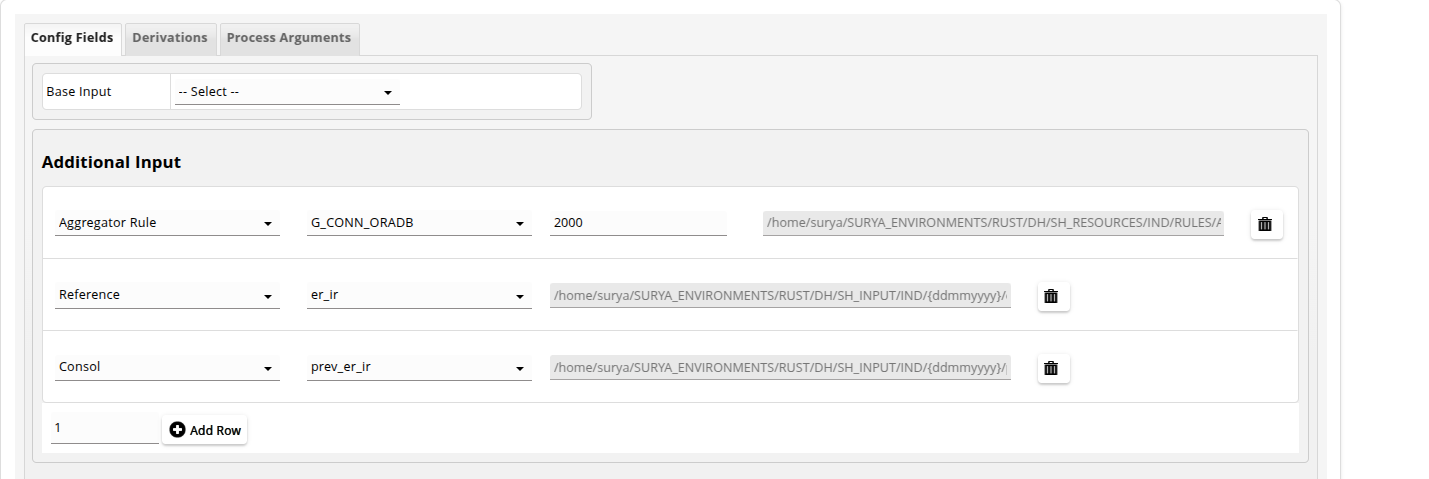
| # | File | Description | Example |
|---|---|---|---|
| 1 | input_metadata | Path to Exchngae rate file. | test-bed/M_IN001.json |
| 2 | additional_input | Path to additonal files required by the program. | test-bed/M_IN003.json. |
| 3 | output_metadata | Path to output_metadata file. | test-bed/M_OP001.json |
| 4 | AggrRule | Path to Rule files required by the program. | test-bed/rule.txt |
| 5 | Consol | Path to Consol files required by the program. | test-bed/M_IN003.json |
5.1 Required field file 🔗
| # | Parameters | Description | From Metadata | Mandatory |
|---|---|---|---|---|
| 1 | file_id | Id of the input file | M_IN002 | TRUE |
| 2 | ccy | Currency of the cashflows | INPUT FILE METADATA | TRUE |
| 3 | int_rate | Interest rate for the cashflows | INPUT FILE METADATA | FALSE |
| 4 | int_basis | Interest calculation basis | INPUT FILE METADATA | FALSE |
| 5 | exch_rt | Exchange rate for currency conversion | INPUT FILE METADATA | FALSE |
| 6 | cap | Cap value for the cashflows | INPUT FILE METADATA | FALSE |
| 7 | floor | Floor value for the cashflows | INPUT FILE METADATA | FALSE |
| 8 | benchmark | Benchmark reference rate | INPUT FILE METADATA | FALSE |
| 9 | prin_amt | Principal amount for the cashflows | INPUT FILE METADATA | FALSE |
| 10 | int_amt | Interest amount for the cashflows | INPUT FILE METADATA | FALSE |
| 11 | cf_freq | Cashflow frequency | INPUT FILE METADATA | FALSE |
| 12 | acc_no | Account number | INPUT FILE METADATA | FALSE |
| 13 | rule_id | Rule identifier for processing | M_IN004 | TRUE |
| 14 | llg_attribute_file_id | LLG attribute file identifier | M_IN005 | FALSE |
| 15 | is_exch_rate_appl | Flag indicating if exchange rate is applied | FALSE | FALSE |
| 16 | is_consolidated | Flag indicating if data is consolidated | FALSE | FALSE |
| 17 | is_amt_abs | Flag indicating if amount is absolute | FALSE | FALSE |
| 18 | is_aggr_amt_abs | Flag indicating if aggregated amounts are absolute | FALSE | FALSE |
| 19 | is_neg_amt | Flag indicating if negative amounts are allowed | FALSE | FALSE |
| 20 | default_llg_code | Default LLG code | 1399 | TRUE |
6. Sample test-bed
Click ⬇️ to download the sample data.
7. Output
7.1 Output file-1 : Consolidated Output
It will be uploaded in IRB20 table.
7.2 Output file-3 : Health report
The health check report gives summary about the processed accounts such as success counts, failed counts, etc.🔗