DC_DR_migration_checklist
1. Purpose
The purpose of this document is to establish a comprehensive and standardized checklist for conducting Data Center (DC) to Disaster Recovery (DR) drills. This ensures that all critical components of the application ecosystem are validated for readiness, consistency, and resilience during failover scenarios.
2. Scope
This checklist covers validation of application readiness during the DC to DR drill, including configuration consistency, server synchronization, path validations, and execution testing. It also includes verification of database and shared drive synchronization timelines as coordinated with the bank team.
3. Pre-Requisites
The following prerequisites must be ensured before initiating the DC to DR drill:
- Executor definitions (ExecutorDef) are prepared with correct Executor IDs as per DC setup.
- DHGlobalSettings are updated with accurate values including paths, database details, and other required global variables for the DR environment.
- DHExecutorSettings are configured with correct executor-level parameters such as program paths, shared drive locations, and execution settings.
- All hardcoded paths in /home directories are identified and updated to be valid for the DR environment.
- All hardcoded paths related to shared drives are verified and updated post shared drive synchronization.
- Shared drives are successfully synced and mounted in the DR environment with proper accessibility.
- Database synchronization from DC to DR is completed by the bank team.
- Latest synchronization timelines (DB and shared drives) are confirmed with the bank team.
- All servers within the DR environment (Orchestrator and Executors) are in sync in terms of:
- Application version
- Configuration files
- Environment variables
- Required directories, paths, and dependencies exist and are accessible in DR.
- Necessary access permissions (server, database, shared drives) are available for execution and validation.
- Any gap between sync completion and drill execution is reviewed to avoid data mismatch issues.
- Environment variables and scheduled jobs (cron/Task Scheduler) on all DR servers are validated and synchronized with DC (Linux and Windows).
4. Pre-Requisites (Detailed)
The following prerequisites must be thoroughly validated before initiating the DC to DR drill to ensure a smooth and accurate failover process:
4.1 Executor Configuration Readiness
- All Executor definitions (ExecutorDef table in Runcontrol) must be created in the DR environment with correct Executor IDs matching the DC setup.
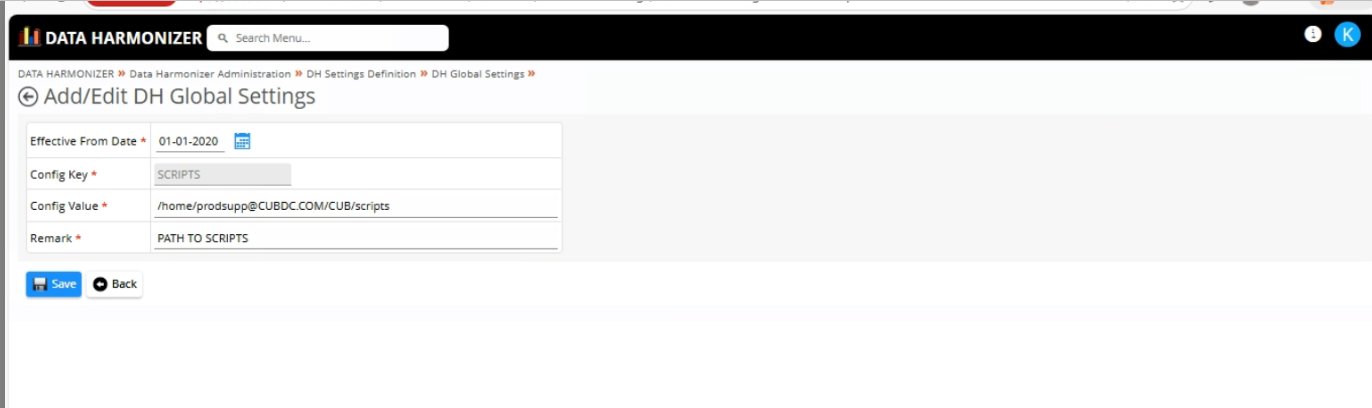
4.2 Global Configuration Setup (DHGlobalSettings)
- All global configuration parameters must be updated for the DR environment.
- This includes:
- Application paths
- Database connection details (host, port, service name)
- Environment-specific variables
- Ensure that no DC-specific values are retained.
- Validate correctness of all critical parameters impacting application behavior.
4.3 Executor-Level Configuration (DHExecutorSettings)
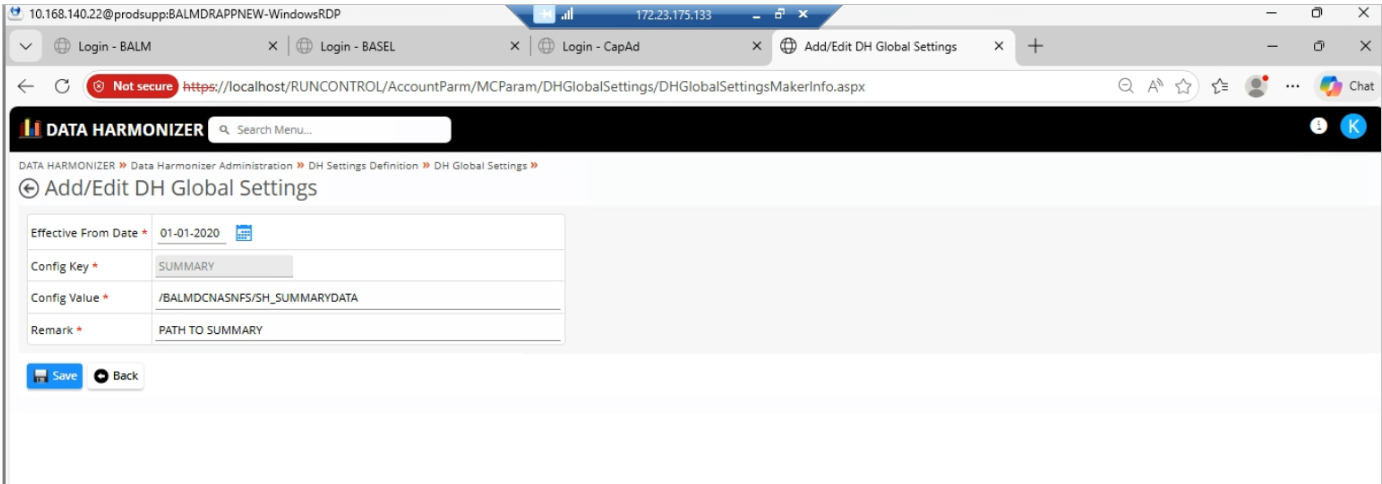
- Executor-specific settings must be configured accurately.
- Validate:
- Program/script paths
- Shared drive locations
- Execution parameters and limits
- Ensure all referenced paths and resources exist in DR.
- Confirm there are no missing or incorrect configurations.
4.4 Hardcoded Path Validation – /home Directory
- Perform a thorough scan of application configurations, scripts, and server setup for hardcoded
/homedirectory paths. - Replace any DC-specific paths with DR-compatible paths.
- Ensure:
- All directories exist in DR
- Proper permissions are assigned
4.5 Hardcoded Path Validation – Shared Directory
- Identify and validate all hardcoded shared drive paths.
- Ensure shared drives are:
- Successfully synced by the bank
- Properly mounted in DR servers
- Verify:
- Path consistency with DC
- Directory structure availability
- Read/write permissions
- Test file access to confirm usability.
4.6 Server Synchronization Validation
- Ensure that all servers within the DR environment (Orchestrator and Executors) are fully synchronized.
- Validate:
- Same application version and patches
- Identical configuration files
- Consistent environment variables
- Perform comparison checks to avoid configuration drifts.
- Confirm that all servers are aligned before starting the drill.
4.7 Database Synchronization Readiness
- Confirm with the bank team that database synchronization from DC to DR is completed.
- Validate:
- Latest available data is present in DR
- No pending replication backlog
- Ensure database connectivity from DR application servers is successful.
4.8 Shared Drive Synchronization Readiness
- Confirm shared drives are fully synced and accessible in DR.
- Validate mount points across all servers.
- Ensure no missing or partially synced files/directories.
4.9 Synchronization Timeline Validation
- Obtain and verify synchronization timestamps for:
- Database
- Shared drives
- Ensure there is minimal or acceptable lag between DC and DR.
- Identify any time gap between:
- Sync completion
- Drill execution
- Assess risk of data mismatch due to delays and take necessary precautions.
4.10 Backup & Rollback Preparedness
- Take backup of current DR configurations before making any changes.
- Keep reference of DC configurations for comparison.
- Ensure rollback plan is available in case of issues during drill.
4.11 Environment Variables Validation
Linux
- Compare
.bash_profile,.bashrc,.profile,/etc/profile.d/between DC and DR - Validate
PATH,JAVA_HOME,ORACLE_HOME, app-specific variables - No DC-specific hostnames/IPs/paths hardcoded
- Aliases/shell functions work in DR
echo $PATH/ sample script run confirms resolution
Windows
- Compare System and User environment variables between DC and DR
- Validate
PATH,JAVA_HOME, app-specific variables - No DC-specific hostnames/IPs/drive letters/UNC paths hardcoded
- Variables consistent across all DR servers
- Restart sample app/process to confirm variables take effect
4.12 Scheduled Jobs Validation
Linux (Cron)
- Compare
crontab -lfor all relevant users, DC vs DR - All scheduled jobs exist in DR with correct timing and paths
- No hardcoded DC-only paths/server references in cron scripts
MAILTO/alerting routes to DR- Cron daemon running/enabled on all DR servers
- Test-run one representative job end-to-end
Windows (Task Scheduler)
- Compare scheduled tasks between DC and DR, per server
- All tasks exist in DR with correct triggers, schedules, action paths/arguments
- "Run as" account/credentials valid in DR
- No hardcoded DC-only paths/server references in task scripts
- Task history/notifications route to DR
- Task Scheduler service running on all DR servers
- Test-run one representative task end-to-end
4.13 Final Readiness Confirmation
- Perform a final walkthrough of all the above checks.
- Ensure all gaps/issues are resolved.
- Obtain confirmation from:
- Application Team
- Infrastructure Team
- Bank/DB Team
- Proceed with drill only after readiness sign-off.
5. Execution Validation
- Start all services in DR
- Trigger sample workflows/jobs
- Validate outputs
- Monitor logs for errors
- Check connectivity (DB, APIs, shared drives)
6. Post-Drill Activities
- Document all observations
- Identify failures and root cause
- Share report with respective teams
- Track issues till closure
7. Risks & Mitigation
| # | Risk | Mitigation |
|---|---|---|
| 1 | Hardcoded paths | Validate before drill |
| 2 | Config mismatch | Use comparison tools |
| 3 | Sync delay | Coordinate with bank |
| 4 | Missing configs | Maintain backup |
| 5 | Missing/mismatched environment variables (Linux/Windows) | Compare env variables/profile scripts DC vs DR before drill |
| 6 | Missing/mismatched scheduled jobs (cron/Task Scheduler) | Compare scheduled jobs DC vs DR; test-run sample jobs |
Note
DC servers should be fully in sync before performing DC-DR migration to avoid configuration mismatches and data inconsistencies.
8. Conclusion
This checklist ensures readiness of the DR environment by validating configurations, synchronization, and execution capabilities. Any gaps identified during the drill must be documented and resolved to ensure a smooth and reliable failover during actual disaster scenarios.